
Gaming Controller Buyer’s Guide: How to Choose the Right One
A gaming controller is more than just an accessory; it's an extension of your hands in the gaming world. Yet, choosing the right one can quickly become a headache. Between marketing promises, impenetrable spec sheets, and flashy designs, it's easy to make a misstep. This guide is here to help you decode the jargon and find the perfect gamepad for your playstyle, while avoiding the most common pitfalls.
The 3 Pitfalls to Avoid When Buying a Controller
The market is saturated with models, but not all are created equal. Here are the three most frequent issues that can ruin your gaming experience and your investment.
- The Plague of "Joy-Con Drift" (and its Equivalents): This is every gamer's nightmare. After a few months of use, the joystick registers phantom inputs, making games imprecise or even unplayable. This phenomenon, caused by the wear and tear of internal components (potentiometers), affects many controllers, including the most reputable official models.
- Compatibility on Paper: A controller might boast that it's compatible with PC, Switch, and Xbox, but the reality is often more nuanced. Frequently, key features like HD rumble, the gyroscope on Switch, or adaptive triggers only work on a single, specific platform. You end up with a high-performance PC controller that becomes a basic gamepad once connected to a console.
- Ergonomics Sacrificed at the Altar of Style: A futuristic RGB controller might be pleasing to the eye, but it can turn into a real ordeal after an hour of gameplay. Sharp angles, poor weight distribution, or slippery materials can cause premature fatigue and hinder your performance.
The Technical Criteria That Make a Difference
To make an informed choice, you need to read between the lines of the spec sheet. Let's focus on two aspects that are real game-changers.
1. Sensor Technology: Potentiometers vs. Hall Effect
This is arguably THE most crucial technical point for ensuring the longevity of your joysticks.
- Potentiometers (Standard): The vast majority of controllers use this technology. A physical contact rubs against a resistive track to detect movement. Over time, this friction degrades the track and accumulates debris, which causes the infamous "drift."
- Hall Effect Sensors: A Hall effect controller uses magnets and magnetic sensors. There is no physical contact, and therefore no mechanical wear. This technology provides long-term prevention against drift and guarantees consistent precision over the long haul. It's a true mark of quality and durability.
2. Connectivity: Wired, Wireless, and the Latency Question
The choice between a wired connection and a wireless controller depends on your habits and how demanding you are.
- Wired (USB): Offers an ultra-stable connection and near-zero latency. It's the top choice for competitive gaming, and it also frees you from any battery constraints.
- Wireless (Bluetooth): Convenient and free of cumbersome cables, but can introduce slight latency. Perfect for single-player games or more casual sessions.
- Wireless (2.4 GHz): Uses a dedicated USB dongle for a very low-latency connection, almost indistinguishable from wired. It's the best compromise for a wireless pro controller intended for competition on PC or Xbox.
Our Selection of Controllers for Different Gamer Profiles
Because every gamer is unique, we've selected models that meet specific needs, all while avoiding the pitfalls we've just discussed.
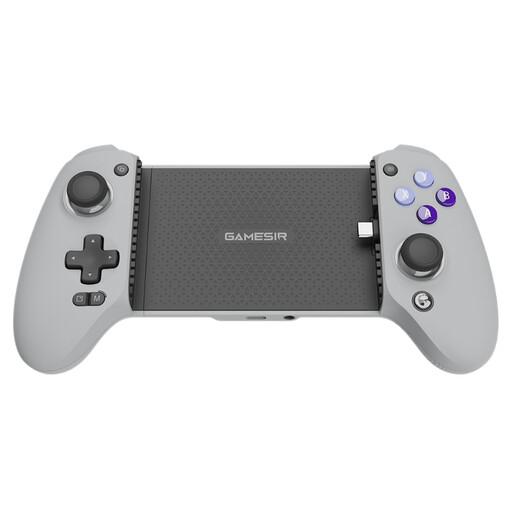
GameSir-G8 Galileo Type-C Wired Mobile Gaming Controller
Why this model? This controller transforms any smartphone (Android or iOS) into a true portable console, offering ergonomics and precision worthy of a home console controller for mobile games. A must-have for those who take mobile gaming seriously.
It features analog joysticks and triggers with Hall effect technology, making it natively immune to the drift problem and guaranteeing far above-average durability.
Direct USB-C connection for zero latency and pass-through charging to ensure you never run out of battery mid-game.
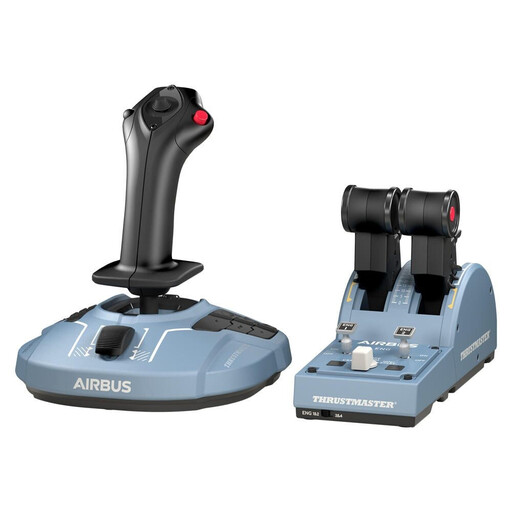
Thrustmaster TCA Officer Pack Airbus Edition
Why this model? Designed for PC simulation fanatics, this pack offers a faithful replica of an Airbus A320's controls. It's the ultimate choice for immersion for virtual pilots on Microsoft Flight Simulator or X-Plane.
It uses H.E.A.R.T magnetic sensor technology (a variant of Hall effect), ensuring surgical precision and a virtually unlimited lifespan, light-years ahead of the wear-and-tear issues of classic joysticks.
Official Airbus-licensed replica for maximum immersion. Modular and ambidextrous design to adapt to any virtual cockpit setup.
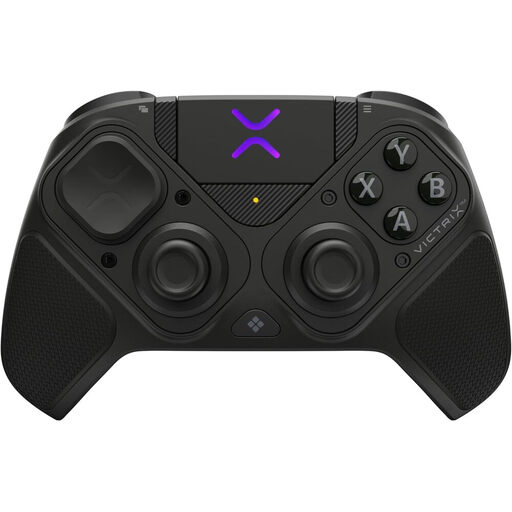
Victrix Pro BFG Reloaded Modular Esport Controller
Why this model? This is a true performance tool built for competitive players on PC and Steam Deck. Its extreme modularity allows it to be reconfigured on the fly to adapt to any game, from FPS to fighting games.
Full Hall effect configuration (joysticks and triggers) for rock-solid reliability. Its modularity allows you to change the button layout, countering the pitfall of unsuitable ergonomics.
Complete modularity with an included 6-button "fightpad" module. "Clutch Triggers" with 5 stopping points for minimal reaction time.
Looking for other options?
Our complete selection features products that meet our quality and durability criteria, all tested and approved by our experts.
Frequently Asked Questions (FAQ)
Is a Hall effect controller really more durable?
Absolutely. Hall effect technology relies on magnetic fields to detect movement, which eliminates the physical contact and friction responsible for wear in traditional controllers. The result: virtually no wear and tear, leading to highly effective prevention of joystick "drift" and significantly increasing the controller's lifespan.
Can I use an Xbox controller on a Switch or vice versa?
Generally, no, at least not directly. Consoles like the Switch and Xbox use proprietary communication protocols. While third-party adapters exist that allow for such connections, they can introduce latency and don't always guarantee support for all features (vibrations, gyroscope, etc.). Our advice: always opt for a controller that clearly states native compatibility with your platform.
How can I avoid latency with a wireless controller?
To minimize latency (or input lag) with a wireless controller, prioritize models that use a 2.4 GHz connection via a USB dongle. This technology is generally faster and more stable than standard Bluetooth. For competitive games where every millisecond counts, a wired connection remains the most reliable solution. Also, remember to keep your controller's firmware up to date, as manufacturers often release patches that improve performance.