
Wireless microphone for smartphone: how to choose a reliable kit for your videos
A voice drowned out by the wind, a cable catching on clothing or a flat battery just as an interview begins can ruin an otherwise well-framed video. Whether you are recording a vlog, livestream, online lesson or podcast on your phone, a wireless microphone for smartphone must above all be compatible, reliable and easy to use.
Product listings often highlight range, noise reduction or high-definition audio quality. This information is useful, but it is not enough to distinguish between two kits. Here are the criteria to consider before buying, along with a selection suited to different uses.
Common pitfalls before buying
1. Overly broad compatibility claims
A microphone may work with a phone featuring a USB-C port without being compatible with an iPhone fitted with a Lightning connector. Some models require a specific adapter, while others are designed only for a camera or computer.
Before placing your order, check carefully:
- the receiver connector type: USB-C, Lightning or audio output for a camera;
- compatibility with your smartphone model;
- whether an adapter is included in the box;
- whether the kit can be used with a tablet, computer or camera.
A USB-C wireless microphone is suitable for many Android devices, as well as newer iPhones equipped with this port. However, this compatibility must be confirmed in the product specifications.
2. Confusing theoretical range with real-world use
A stated range of up to 100 metres generally refers to an open space with no significant obstacles. In a flat, classroom or busy street, walls, other wireless devices and people can significantly reduce the usable distance.
For a wireless microphone for iPhone and Android, prioritise a system that works reliably over short and medium distances. During an interview or outdoor shoot, stable transmission and a backup recording may be more useful than an impressive maximum range.
3. Relying solely on noise reduction
Noise reduction can reduce certain background sounds, but it cannot replace correct positioning. A lavalier microphone positioned too low, rubbing against clothing or left exposed to the wind will still produce uneven audio.
Check whether the product offers:
- several levels of noise reduction or an activation button;
- a microphone built into the transmitter;
- internal backup recording;
- a wind muff or accessory suitable for outdoor filming.
Settings to check before choosing
Connectivity and devices used
When filming with a phone, the receiver must connect without obstructing the device’s other essential functions. A USB-C kit is generally convenient with Android and compatible devices. For an iPhone with a Lightning port, choose a model with the corresponding connector.
If you also create videos with a camera, look for an output or receiver designed for this purpose. A camera microphone may require a different cable or setting from the one used with a smartphone.
Number of transmitters
A kit with a single transmitter is sufficient for a solo vlog or an on-camera presentation. Two transmitters are better suited to an interview, two-person podcast or video featuring several speakers.
The number of available channels also deserves your attention. Some systems can handle several transmitters or receivers, making multi-person productions easier, within the limits of the configuration specified by the manufacturer.
Battery life and backup recording
The stated battery life should be considered alongside the format of your shoots. A battery lasting a few hours may be enough for short videos, but become restrictive during a full day of interviews or an event.
A charging case makes transport easier and allows you to recharge the devices between takes. Internal recording provides welcome protection in the event of a transmission dropout. However, you will need to remember to transfer the files and regularly check the available storage space.
For more consistent wireless audio recording, also check for a mute button, automatic pairing and the option to recharge the system while it is in use, where this feature is supported.
Our selection by user profile
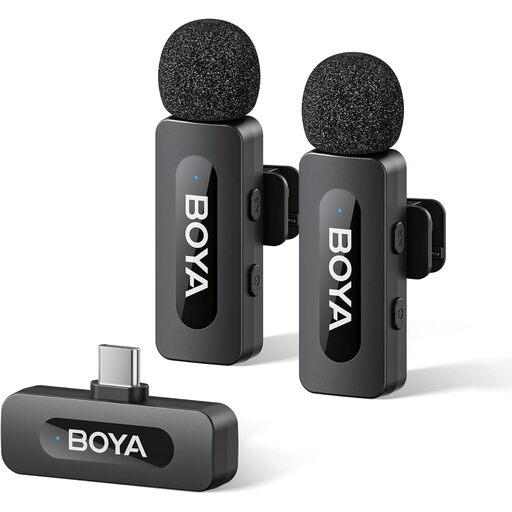
BOYA BY-V20 V2.0 USB-C Wireless Microphone
Why this choice suits this profile: With its two transmitters, this kit is ideal for creators starting out with a USB-C smartphone who want to record conversations or two-person videos.
The USB-C connection and one-button noise reduction minimise setup. Nevertheless, make sure your phone supports this connector.
Two transmitters, a USB-C receiver and a stated battery life of up to 9 hours. The manufacturer provides a noise-reduction button, while pairing is carried out according to the instructions in the manual.
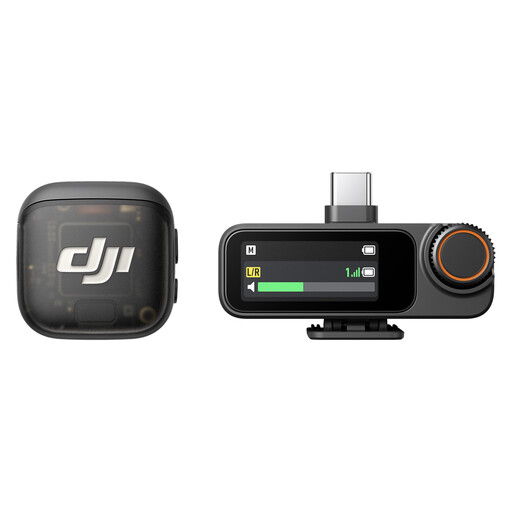
DJI Mic 3 - 2 TX + 1 RX + Charging Case
Why this choice suits this profile: This two-transmitter configuration is aimed at videographers, podcasters and teams looking for a complete kit with a storage and charging case.
The case reduces the risk of leaving an item behind during transport and makes it easy to keep the different modules together. The devices contain batteries and must not be exposed to water or taken apart.
The system includes 2 TX, 1 RX and a charging case. The receiver is described as a dual-channel model with built-in audio recording, making it suitable for two-person recordings.
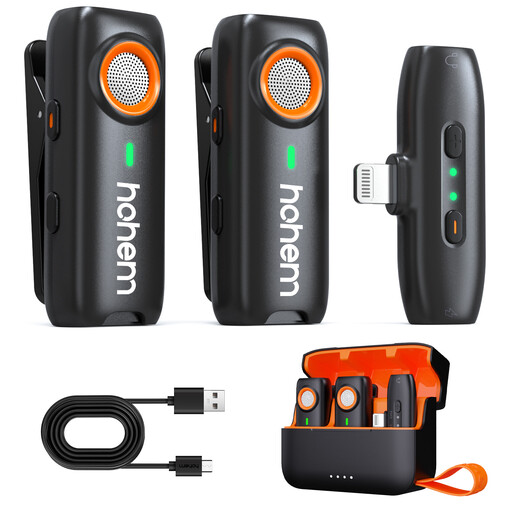
hohem Wireless Lavalier Microphone
Why this choice suits this profile: Its local recording to a TF card and three levels of noise processing make it suitable for interviews, online lessons and extended shoots.
Saving to a TF card can provide a backup copy if the wireless connection encounters a problem. The card is not included and the stated connector is Lightning, so check compatibility with your device before buying.
The listing states a range of up to 100 metres in open space, total battery life of up to 20 hours with the case and a lavalier microphone design.
Looking for more options ?
We have put together a complete, real-time updated list of products that meet these demanding selection criteria, as well as European safety regulations.
How to set up a wireless microphone for a smartphone
Before starting the recording, take a few seconds to carry out these checks:
- Charge the transmitter, receiver and case if necessary.
- Connect the receiver to the phone or camera using the appropriate connector.
- Check the pairing, then select the external microphone in the app you are using.
- Attach the lavalier microphone at a consistent distance from your mouth, without slipping it beneath several layers of clothing.
- Record a few seconds with noise reduction enabled, then compare the result with the feature disabled.
- Listen back through headphones before an interview, livestream or important shoot.
For a vlog microphone, position yourself away from gusts of wind and avoid touching the transmitter during recording. For a podcast microphone, a quiet room and consistent positioning will often have a greater impact on the result than a high stated range.
Wireless microphone for smartphone FAQ
Will a wireless microphone work with every phone?
No. Compatibility depends on the connector, operating system and recording app. Check whether the kit uses USB-C or Lightning and whether your phone accepts an external audio input. An adapter may be required.
How much battery life is needed for a full day of filming?
For short sequences, a few hours may be enough. For a full day, choose a kit with a charging case and, if possible, a feature that allows the system to be recharged during recording. Actual battery life varies according to sound level, transmission and the features enabled.
Should you choose a wireless lavalier microphone with internal recording?
This feature is particularly useful for interviews, events and shoots where a connection dropout would be difficult to recover from. However, it adds an extra step for transferring and synchronising files. For occasional use, a kit without internal backup may remain simpler to use.