
Xbox Series X Controller Buying Guide: Picks for Every Player
Is your controller worn out from thousands of hours of gameplay, are you eager to dominate your friends in multiplayer, or are you simply seeking better performance? Whatever your reason, choosing a new Xbox Series X controller is a decision not to be taken lightly. The market is flooded with options, from colourful official versions to "pro" models packed with features. So, how do you navigate the choices and see through the marketing hype?
As a product expert at Joybuy, my mission is to guide you. Let's cut through the jargon and focus on what really matters to make a smart choice that fits your budget and your playstyle.
The 3 Pitfalls to Avoid When Buying a Controller
Before you pull out your credit card, let's review the most common pitfalls that can turn a promising purchase into a bitter disappointment.
- The Plague of "Stick Drift": It's the bane of every gamer's existence. After a few months, your character or cursor starts moving on its own. This phenomenon, caused by the wear and tear of the joysticks' internal components (potentiometers), can render a controller useless.
- The Mirage of "Pro" Features: A pro Xbox controller with its back paddles and adjustable triggers is certainly tempting. The problem? On some models, these additions are more gimmick than game-changer, with poorly placed paddles, non-existent customisation software, or low-quality materials that in no way justify the extra cost.
- The Connectivity Conundrum: A wireless Xbox controller doesn't guarantee the same performance across all platforms. Some models rely solely on Bluetooth, which can have noticeable latency, while others use a much more stable 2.4?GHz protocol via a dongle. Be sure to check the technology and compatibility, especially if you switch between PC and console.
Key Criteria for Choosing the Right Controller
To make the right call, focus on these three technical points that will make all the difference in the quality and lifespan of your future controller.
1. Joystick Technology: The Key to a Drift-Free Controller
The primary cause of stick drift is the wear on potentiometers, which are sensors that rely on physical contact. Fortunately, a much more durable alternative has emerged:
- Hall Effect Sticks: These joysticks use magnetic sensors to detect movement without any physical contact. The result: no friction, therefore no wear. The risk of drift is virtually eliminated. If longevity is your number one priority, opting for an anti-drift Xbox controller with this technology is the best investment you can make.
2. Connectivity and Latency: Wireless or Wired?
Your choice of connection has a direct impact on your gaming experience, especially if you're into competitive play.
- Xbox Wireless: Microsoft's proprietary protocol offers a low-latency, stable wireless connection optimised for Xbox consoles. It's the gold standard for a seamless console experience.
- Bluetooth: Convenient for its versatility (PC, mobile devices), Bluetooth can sometimes introduce slight latency. Official Xbox controllers handle this dual connectivity very well.
- 2.4?GHz (with dongle): Often used by third-party controllers (like a Razer Xbox controller or Turtle Beach Xbox), this mode delivers competition-grade wireless performance, rivalling a wired connection, but it means sacrificing a USB port for the dongle.
- Wired (USB-C): Guarantees near-zero latency and frees you from battery constraints. The preferred option for competitors and many PC gamers.
3. Customisation: Paddles, Modularity, and Triggers
Advanced features are only worthwhile if they are genuinely well-designed.
- Back Paddles: An Xbox controller with paddles allows you to assign actions (jump, reload, etc.) to buttons on the back, without ever taking your thumbs off the sticks. Ergonomics and ease of programming are crucial here.
- Adjustable Triggers: Some models allow you to shorten the travel distance of the triggers. A short pull is ideal for FPS games (faster shots), while a long pull is better for racing games (precise acceleration control).
- Modularity: Controllers like those from Victrix allow you to physically change the layout of the modules (joystick, D-pad) or even install a 6-button fight pad, offering extreme customisation.
Top Xbox Controller Picks
Rather than an endless list, we've opted for targeted recommendations for three distinct player profiles. The goal: to help you find the model that's truly right for you.
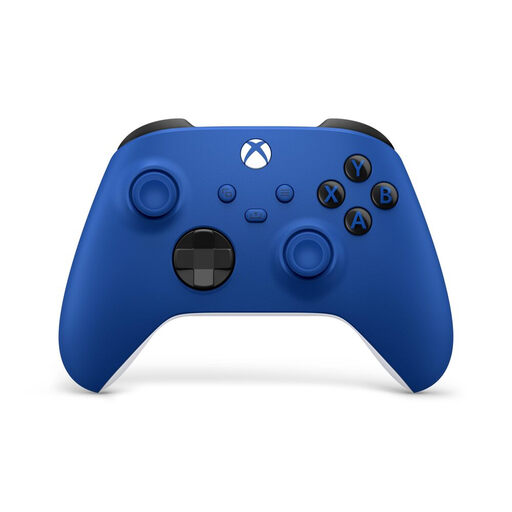
Xbox Wireless Controller - Electric Blue
Why we chose it: This is the gold standard, the absolute benchmark. Perfect for gamers looking for a reliable, comfortable controller that's compatible with the entire Xbox ecosystem (Series X|S, One, PC, Cloud Gaming). Its ergonomics are universally praised, and it has an intuitive feel.
It avoids the extra cost of superfluous "pro" features for standard use. Its dual Xbox Wireless and Bluetooth connectivity is tried and true, eliminating any nasty compatibility surprises.
Maximum versatility and excellent value for money. The hybrid D-pad and textured surfaces improve control. A safe bet, available in many colours, including as a limited edition Xbox controller.
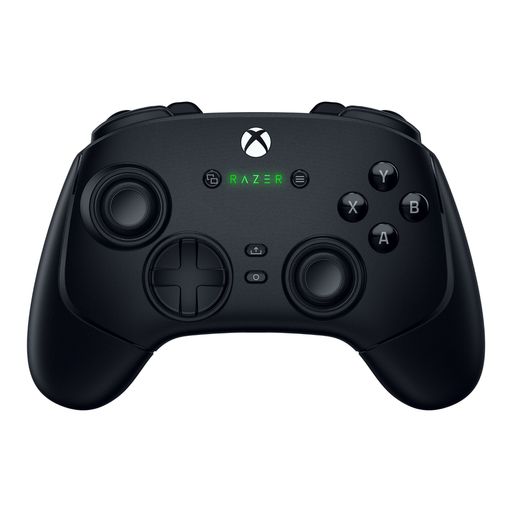
Razer Wolverine V3 Pro Wireless eSport Controller - Xbox & PC
Why we chose it: Engineered for performance, this controller is for gamers who leave nothing to chance. It's packed with a technological arsenal to improve responsiveness, precision, and durability.
It tackles the "stick drift" problem at its root with its Hall effect sticks. Its "pro" features (6 programmable buttons, HyperTriggers) are relevant, well-integrated, and justify the investment. The HyperSpeed Wireless 2.4 GHz connection ensures minimal latency.
Esports-grade durability and customisation. The mecha-tactile buttons provide a crisp, responsive click, while the adjustable triggers allow you to adapt to any playstyle.
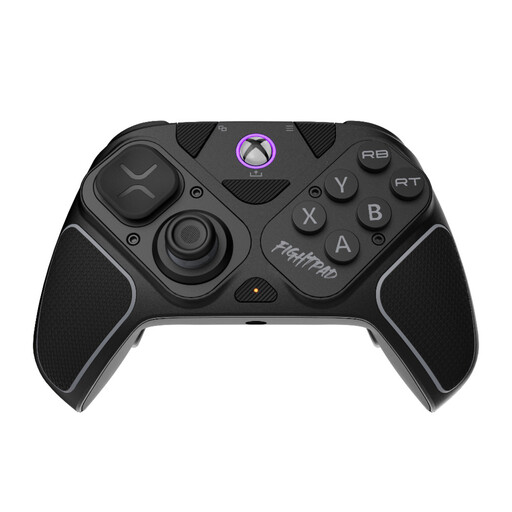
Turtle Beach Victrix Pro BFG Reloaded Wireless Modular Esport Controller
Why we chose it: This is the Swiss Army knife of controllers, for gamers who love to adapt their hardware to every game. Its modular design allows it to be completely reconfigured, whether for an FPS, a racing game, or a fighting game.
It incorporates Hall effect sticks and triggers for maximum durability. The modularity isn't just a gimmick: the 6-button "Fightpad" module is a real game-changer for fighting games, and the interchangeable components let you find the perfect ergonomic fit.
Extreme modularity and high-performance components. The 4 programmable back paddles and the "Clutch Triggers" with 5 stopping points offer a formidable level of precision control.
Looking for more options?
We have curated a complete range of products that meet our demanding selection criteria and current quality standards.
Frequently Asked Questions (FAQ)
What is the lifespan of an Xbox Series X controller?
The lifespan of an official Xbox controller heavily depends on the intensity of your use. For moderate use, it can last several years. However, with heavy use, the infamous stick drift can rear its ugly head after a year or two. Models equipped with Hall effect sticks, like those from Razer or Turtle Beach, are designed to last much longer by tackling the root of the problem.
Is an Xbox Series X controller compatible with a PC?
Yes, absolutely. The Xbox Wireless Controller is one of the most popular options for PC gamers. You can connect it in three ways:
- Via a USB-C cable: Simple, reliable, and latency-free.
- Via Bluetooth: Most modern laptops and desktops are equipped with it.
- Via the Xbox Wireless Adapter for Windows: Sold separately, it provides a more stable connection and lower latency than Bluetooth, for an experience nearly identical to that on a console.
AA batteries or a rechargeable battery pack: which to choose?
Official Xbox controllers run on two AA batteries, offering up to 40 hours of battery life according to Microsoft.
- Advantages of batteries: Easy to replace, no wear on an internal battery over time. You can opt for rechargeable batteries for a more economical and eco-friendly solution.
- Advantages of a built-in battery: Often found in pro controllers, they simply recharge via a USB-C cable. No more buying batteries. The downside is that their capacity will diminish over time and they are rarely user-replaceable.
The final choice will depend on your preference: the simplicity of direct charging or the flexibility of interchangeable batteries.