
Wireless gaming controller: how to choose the right model for your console
Buying a wireless gaming controller seems straightforward… until compatibility, battery life or comfort make things more complicated. A Bluetooth controller designed for a Nintendo Switch will not necessarily perform in the same way on a PC or mobile device. As for battery life advertised as « up to » several hours, this depends in particular on the vibration level, volume and distance from the console.
Before comparing models, here are the main pitfalls to avoid.
Common mistakes to avoid before buying
1. Confusing compatibility with connectivity
Bluetooth connectivity does not guarantee universal compatibility. A PS5 controller may work with PC, Mac, iOS or Android, but certain features — such as adaptive triggers or haptic feedback — depend on the game and the device being used.
For a Nintendo Switch controller or a Switch 2 controller, always check the precise list of compatible consoles. The simple mention « wireless » is not enough to confirm that your model will be supported.
2. Relying solely on the advertised battery life
A rechargeable controller can offer very different battery life depending on how you use vibration, motion sensors or lighting. Figures provided by manufacturers are a useful guide, but they do not guarantee the same runtime in every situation.
Also check whether a USB-C cable is included. This is not always the case, particularly with some models designed for the PlayStation 5.
3. Overlooking ergonomics and button layout
A controller can offer plenty of features without being comfortable to hold, especially if its shape does not suit your hands. Weight, the texture of the grips, the spacing between the joysticks and trigger travel all have a direct impact on comfort.
Programmable rear buttons, Turbo mode and LED lighting are only useful if they remain easy to use. For longer sessions, an ergonomic controller with a familiar layout may be more comfortable than a model packed with options.
Things to check before choosing
Compatibility with your devices
Start by identifying how you mainly intend to use the controller:
- PS5: choose a controller officially designed for the console if you want to enjoy features specific to the PlayStation ecosystem.
- Nintendo Switch and Switch 2: check compatibility with the console, wireless mode, motion sensors and whether the console can be woken from sleep mode.
- PC: a PC controller may work via Bluetooth, with a wireless receiver or through USB. Make sure it is compatible with Windows and the games you want to play.
- Smartphone and tablet: check which systems are supported, whether a phone holder is included and how the controls are configured.
Battery life, charging and connection type
An integrated battery that recharges via USB-C saves you from having to buy batteries regularly. Compare the advertised battery life, charging time and whether you can continue playing while the controller is charging.
A wired controller remains an appealing choice for a fixed setup, fighting games or players who do not want to be interrupted by a flat battery. A 2.43 or 3-metre cable offers greater freedom of movement, but you will need to avoid the risk of trips or snagging.
Useful features, but not essential
Vibration, gyroscopic sensors, adaptive triggers and programmable buttons can enhance the experience, provided they are supported by the console or game. On some models, vibration can be adjusted across several levels. On others, it is simply not available.
For competitive players, low latency and customisable controls may matter more than lighting. For family gaming, easy pairing and comfortable use will often take priority over advanced features.
Our selection based on your gaming profile
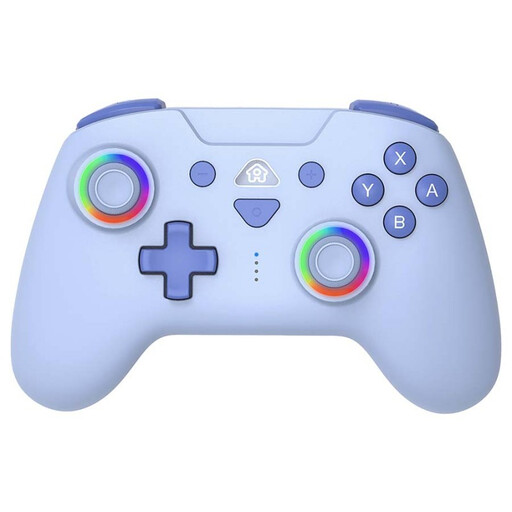
SUBSONIC wireless controller for Switch and Switch Lite with LED, blue
Why this choice suits this profile : this Bluetooth controller is aimed at Switch players who want to replace their Joy-Con controllers or add a controller for multiplayer gaming.
The product listing clearly states compatibility with Switch 2, Switch, Switch OLED and Switch Lite, as well as a USB-C rechargeable battery offering 9 to 10 hours of battery life.
Two programmable rear buttons, motion sensors, three vibration levels and Turbo mode.
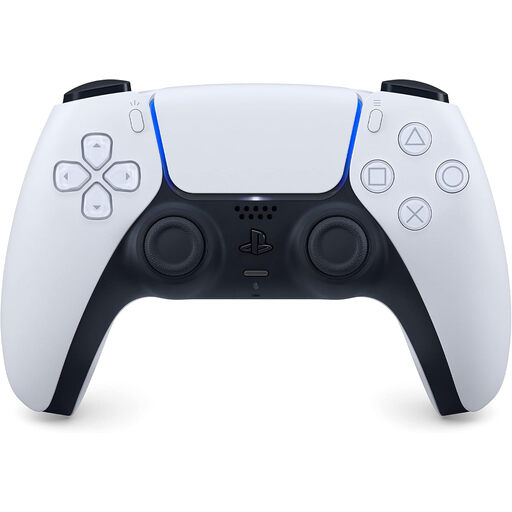
Sony DualSense wireless controller for PS5, white
Why this choice suits this profile : it is aimed at PS5 players looking for console-specific features, while still offering the option to use it with several devices.
The product listing details compatible devices and distinguishes Bluetooth connectivity from USB-C charging. The charging cable is sold separately.
Haptic feedback, adaptive triggers, built-in microphone and stated compatibility with PS5, PC, Mac, iOS and Android.
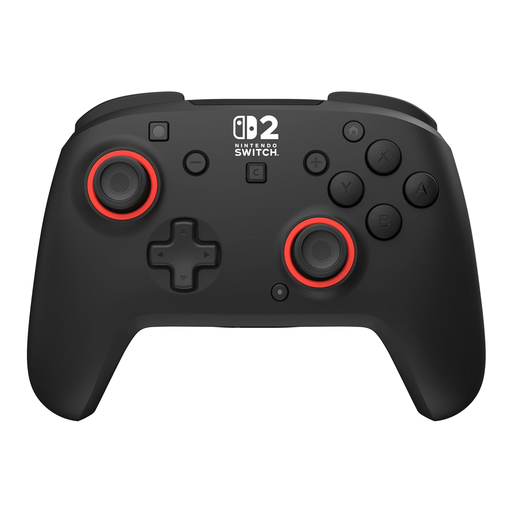
Turtle Beach Rematch wireless Bluetooth controller
Why this choice suits this profile : this model is aimed at Switch and Switch 2 players who play regularly and want to recharge less often.
The product listing states up to 40 hours of battery life, a wireless range of up to 9 metres and a 2-year manufacturer’s warranty.
TMR joysticks, two programmable buttons, motion detection and a dedicated C button for GameChat features.
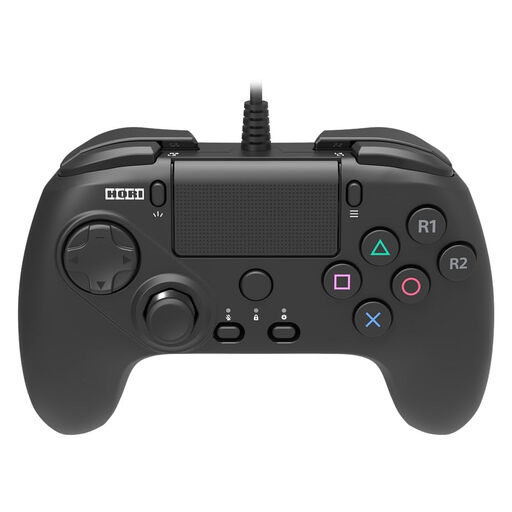
Hori Fighting Commander Octa wired controller for PC, PS4 and PS5
Why this choice suits this profile : this wired controller is aimed at fans of fighting games on PS5, PS4 or PC, focusing on direct, responsive controls.
The USB connection means there is no need to monitor the battery level. The 3-metre braided cable provides plenty of room to move, but requires careful storage.
Six front-facing buttons, a directional pad with adjustable sensitivity and customisable profiles via the HORI Device Manager app.
Looking for more options ?
We have put together a complete, real-time-updated selection of products that meet these demanding criteria and European safety standards.
Frequently asked questions about wireless gaming controllers
How do you connect a Bluetooth controller to a console or PC ?
Activate the controller’s pairing mode, then open the Bluetooth menu or the controller settings on your device. On Nintendo Switch, the process usually involves selecting « Controllers », followed by « Change Grip/Order ». On PC and mobile devices, select the controller’s name from the list of available devices.
How long does a rechargeable controller last ?
It all depends on the battery, how often you use the controller and which features are enabled. The models in this selection advertise between 9 and 10 hours, 15 hours or up to 40 hours of battery life, depending on the reference. Capacity gradually decreases over charging cycles. Avoid heat and moisture, and do not use a damaged cable.
Is a wired controller better than a wireless controller ?
It can be ideal for a fixed setup, fighting games or players who prefer a direct connection. A wireless gaming controller offers greater freedom and avoids cables trailing across the floor, but it needs recharging and its compatibility must be checked. The best choice therefore depends on your setup and gaming habits.